Updated
Workflow Studio: observe and design Claude Code workflows
Claude Code's Workflow tool fans out subagents in parallel and leaves the result on disk as raw logs. I built a local dashboard that reads those artifacts and renders the run, plus a block canvas that compiles back to a runnable script. Here is what it does, what it deliberately does not do, and how to install it.
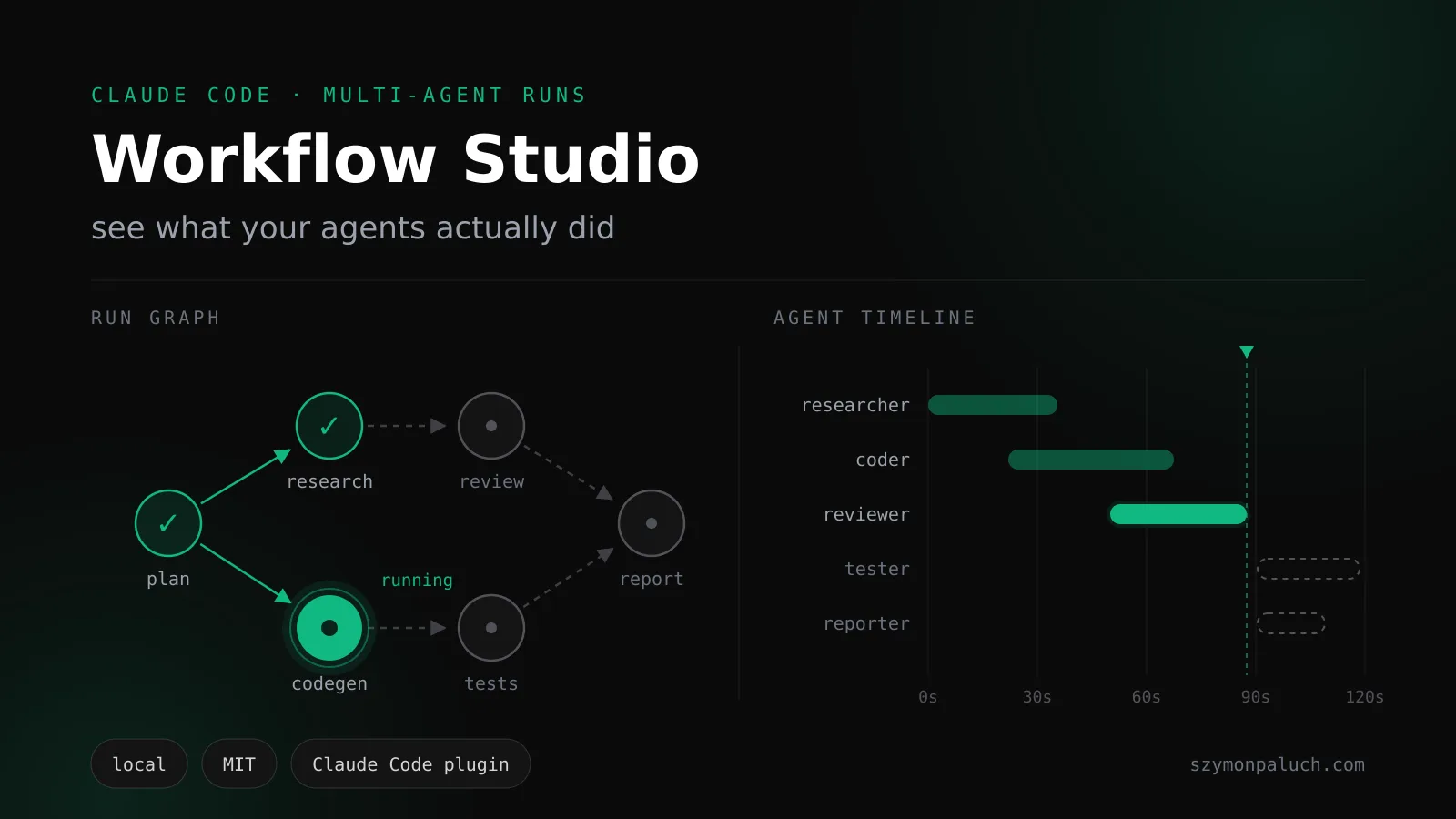
The short version: Workflow Studio is a local companion for Claude Code's built-in Workflow tool. It has two halves. Observe is a dashboard that reads Claude Code's own on-disk run artifacts and draws each multi-agent run as a phase graph and a wall-clock timeline. Author is a 12-block canvas that compiles to a real, runnable Workflow script. Both are exposed to the agent through an MCP server with nine tools. It runs on 127.0.0.1, it is MIT-licensed, and you install it with one paste. The current release is v0.2.0.
The problem: a multi-agent run is a black box
Claude Code's Workflow tool is its deterministic multi-agent primitive: you write a small JS script that fans agents out in parallel, pipes a list through stages, gates on a value, loops until a condition holds. It works. The problem starts the moment the run finishes.
A finished run leaves real artifacts on disk. Under ~/.claude/projects/<project>/<session>/subagents/workflows/wf_*/ you get a journal.jsonl, a per-agent transcript for every subagent, and a small metadata file each. That is a lot of ground truth. Nothing renders it. So you scroll. You cannot see the phases at a glance, how wide the fan-out actually went, how many tokens each agent burned, how long each one took, or which branch a gate picked when it mattered.
That is the same shape of failure I wrote about in silent failures in agentic systems: nothing crashes, so nothing tells you that eleven of your twelve verifiers returned an empty result. And it compounds on the authoring side. The only way to build one of these is to hand-write the script, and the only channel between the script you wrote and the agent that runs it is a .js file dropped on disk.
What Workflow Studio is
A locally-run companion layer, not a runtime. It ships no agents of its own and defines no execution engine. It sits on top of the one you already have. Two surfaces plus a channel:
- Observe: a dashboard that passively reads Claude Code's run artifacts and renders each run as a phase/agent graph and a timeline;
- Author: a no-code block canvas that compiles down to a real Workflow script;
- MCP: a stdio server with nine tools, so the same Claude Code agent that runs your workflows can also read your designs, inspect the observations, and write new designs back into your builder. Designing MCP servers is a domain of its own on the architect exam: a walkthrough of what the certification covers.
One thing to be clear about up front, because it shapes everything else: Workflow Studio cannot start a run. Not over MCP, not from the builder. It reads what Claude Code already produced and it hands the agent a script the agent runs with its own Workflow tool. That is a design decision, not a gap, and I explain why in the authoring section.
Observe: see what actually ran
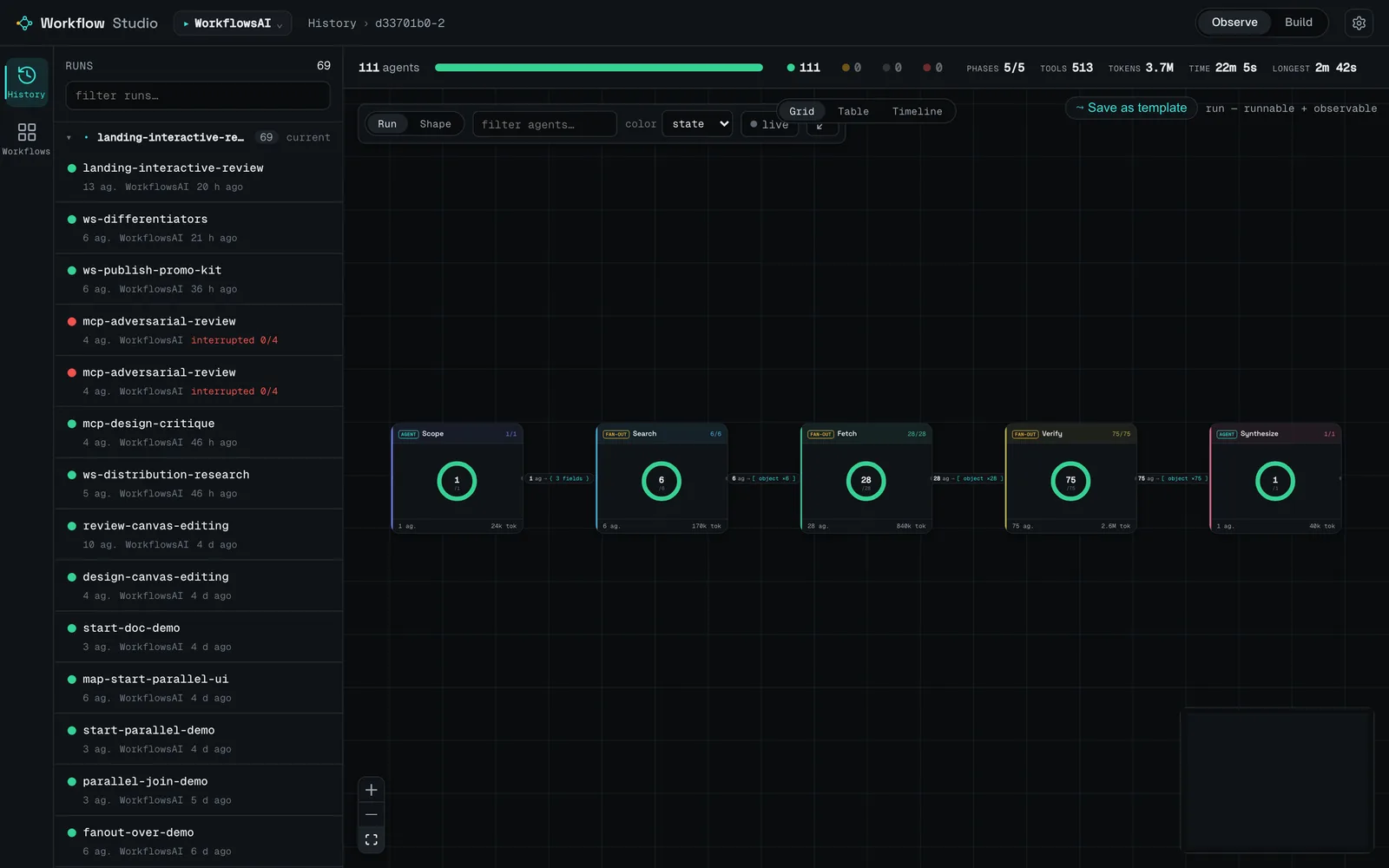
The dashboard turns a run into a graph you can read. Phases, the fan-out, tokens per agent, the branch taken, each agent's output. Click a node and the inspector shows what that agent was given and what it returned: its prompt, its thinking, its tool calls, its output, its model, its state and how long it took, and its spawn depth.
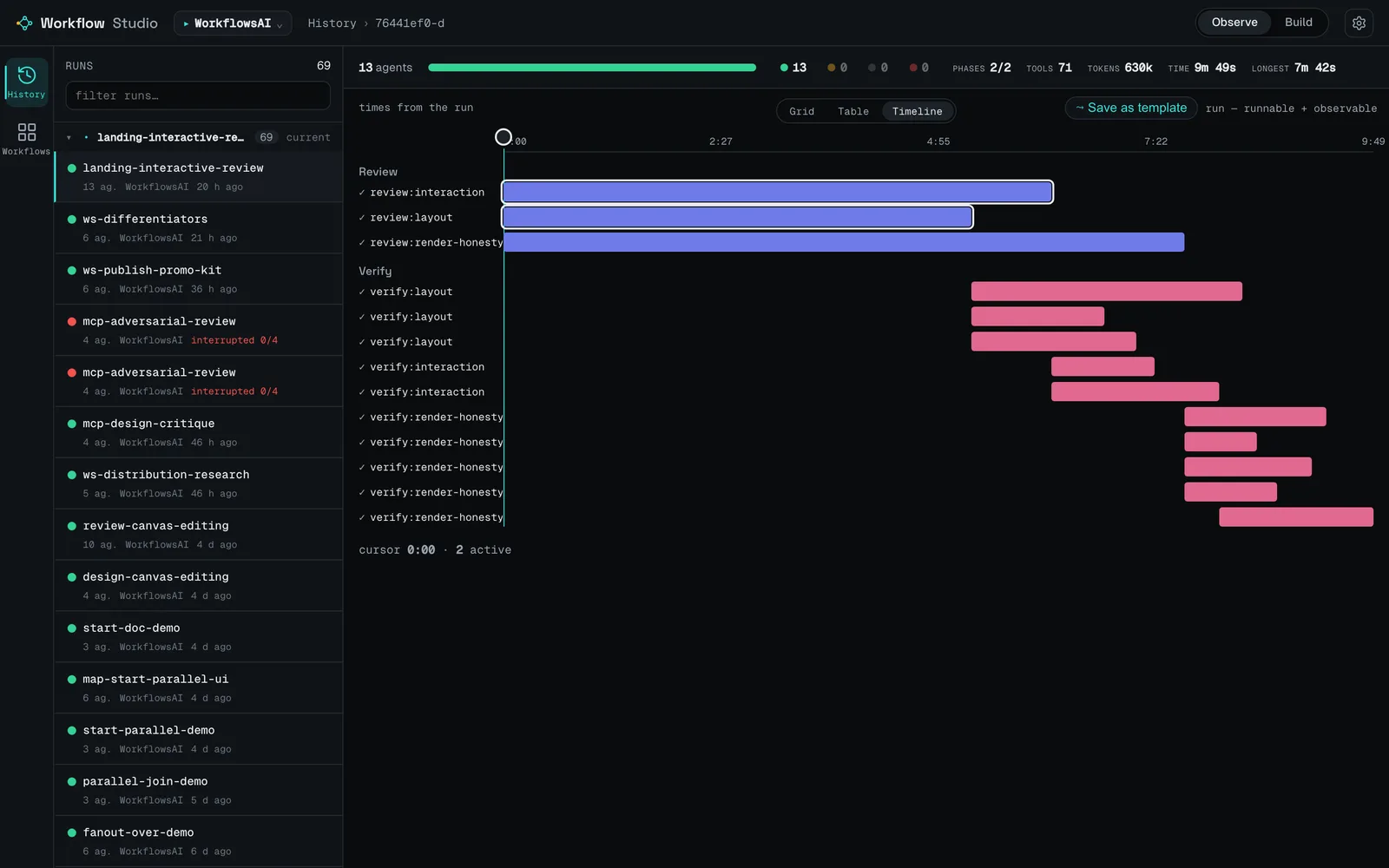
The timeline view answers the other question the graph does not: what overlapped with what. A fan-out that looks like one wide row in the graph is usually a staircase in wall-clock time, and seeing that is how you find out that your second fan-out was waiting on a single straggler from the first.
HONEST BY CONSTRUCTION
The numbers come from two different places and the dashboard says which. When Claude Code's own progress overlay is still on disk, labels, phases, states and token counts are read straight from it and the run is authoritative. When that overlay has already been garbage-collected, phases and labels are derived heuristically from the journal, and the run is flagged as such. Tokens or timings that could not be measured are marked, never invented. A run still in flight is labelled live and its elapsed times are lower bounds. You are never shown a number that looks measured but isn't. The same rule governs every other measurement you take of an agent, including the score that says whether its tests guard anything.
Observing is also where the next workflow usually starts. When a run turns out well, you promote it to a reusable workflow in one click. The graph you were just reading opens in the builder as a starting point, so a good pipeline becomes a template instead of something you reconstruct from memory next month.
Two practical notes. The dashboard refreshes by polling with a short cache, not by pushing. It catches up within a couple of seconds, it is not a socket. And it reads across all your projects and sessions, so old runs stay browsable long after the session that produced them is gone.
Author: build the recipe, not the boilerplate
The other half is a canvas. You drop blocks, wire the ports, and Workflow Studio compiles the graph to a real Claude Code Workflow script: the native calls (agent(), phase(), parallel(), pipeline(), log()) plus a sidecar comment holding the design. The round-trip is lossless: a compiled script reopens as the exact graph you drew, so you can edit it on the canvas, in the editor, or both, without either side losing work.
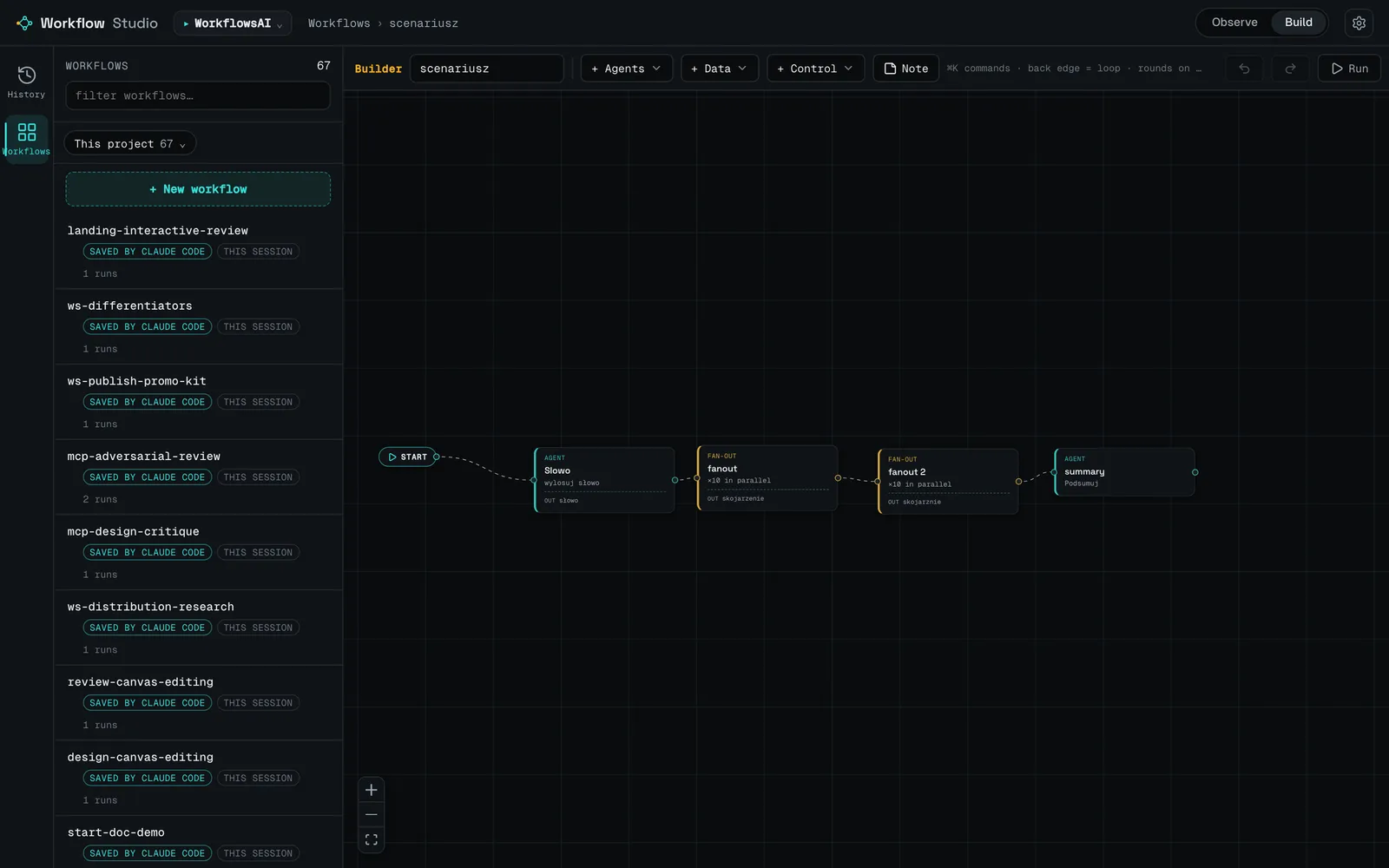
There are twelve block kinds. Each one declares the shape of its output, which is what lets a downstream block branch or map on a real field instead of on a string you hope is there:
| Block | What it does |
|---|---|
| start | The entry anchor. Two or more children run in parallel. |
| agent | One agent with a prompt. |
| fan-out | N agents running the same prompt in parallel. |
| pipeline | Each list item flows through the stages independently. |
| loop | Refine a result in place over N rounds, or until a condition holds. |
| gate | Run a branch only if a declared field meets a condition. |
| switch | Branch on a declared enum value. A k-way router. |
| filter | Keep only list items matching a field. No agent involved. |
| rank | Sort a list by a field and keep the top N. No agent involved. |
| sub-workflow | A nested workflow reused as a single block. |
| input | A fixed list of items. A source for fan-out, pipeline or rank. |
| param | A named value you can @-mention inside prompts. |
You never start from an empty canvas. Every new workflow begins from one of seven built-in patterns that already exercise the dynamic primitives: Basic (agent plus in-place iteration), Classify and act (a classifier enum routing to one of several branches), Fan-out and synthesis, Adversarial verification (independent verifiers trying to refute the worker's result, the same idea as consensus verification), Generate and filter, Tournament, and Loop until done. Pick one, then edit it.
One caveat on the adversarial pattern: without position rotation the panel measures order, not content. The answer shown first gets a 10 to 15 point head start.
THE RUN BUTTON DOES NOT RUN ANYTHING
The builder has a Run action, and it does not execute your workflow. It opens a dialog that says so in plain words and hands you a phrase to paste into Claude Code, then watches for the run to show up in Observe. The reason is boring and load-bearing: a server-side shell-out would turn a loopback dashboard into an unauthenticated local exec surface. I rejected that in design review and I would reject it again. Execution stays where the permissions live: in your Claude Code session.
This is what I do hands-on: advising on AI strategy and building agents that survive the demo.
Install it in one paste
You need uv / uvx on your PATH and Python 3.9 or newer. Nothing else. The dashboard ships pre-built inside the package, so there is no Node step.
You are probably already sitting in a coding agent. Hand it this and walk away:
Read https://github.com/hculap/workflow-studio/blob/main/AGENT_INSTALL.md
and set up Workflow Studio for me — run the steps, verify it,
and tell me whether to restart Claude Code.
Prefer to do it yourself? These two are slash commands you type in a Claude Code session. An agent cannot run them for you:
/plugin marketplace add hculap/workflow-studio
/plugin install workflow-studio@workflow-studio
On Claude Code 2.1 and newer there are shell equivalents (claude plugin marketplace add …, claude plugin install …), which is what the agent path uses. Either way, restart Claude Code afterwards: the MCP tools and the /workflow-studio:dashboard command only load on the next session. Verify with claude mcp list; you want to see the server as connected. If it shows as failed, it is almost always uvx missing from the PATH a GUI-launched Claude Code inherited.
You can also skip the plugin entirely. uvx workflow-studio starts the dashboard on http://127.0.0.1:8787/ and opens a browser; uvx workflow-studio mcp is the MCP server on stdio, which you can register by hand with claude mcp add workflow-studio -s user -- uvx workflow-studio mcp. One caveat worth knowing: uvx pulls the package from PyPI and the plugin pins no version, so you pick up new releases silently.
Workflow Studio, in one page
The landing page has the interactive demos: a canvas you can actually drag blocks around on, and a run graph you can click through.
The Agentic Architect
Practical patterns, case studies and AI news. Zero spam, once a week.
You'll get one email to confirm. Unsubscribe with one click. Privacy policy
Where it fits next to LangGraph, CrewAI and n8n
Workflow Studio is not competing with those. They are a different layer of the stack. LangGraph, CrewAI, AutoGen, the OpenAI Agents SDK, n8n and Flowise each hand you a runtime to adopt, and each is portable across model providers, which is a genuine strength Workflow Studio does not have and is not trying to have. It is worth knowing what portability between model providers actually costs before treating it as free. Workflow Studio assumes you already run Claude Code, and gives you a way to see what a run did and to author the next one visually.
| Tool | What it is | Authoring | Observes real runs | Local · no account |
|---|---|---|---|---|
| Workflow Studio | Observe + author layer for Claude Code's Workflow tool. Not a runtime. | No-code canvas (12 blocks) compiling to a real Workflow script | Yes: reads Claude Code's on-disk artifacts, no SDK, heuristics flagged | Yes: loopback, no account, no telemetry |
| LangGraph + Studio | Provider-agnostic framework for stateful graph agents (Py/JS) | Code-first: you write the graph; Studio visualizes and debugs it | Yes, and strongly: step and time-travel debugging, deep tracing via LangSmith | Partial: library runs local; Studio wants a (free) LangSmith account |
| CrewAI / AutoGen | Code-first multi-agent frameworks | Code (Python / YAML); AutoGen Studio adds a capable no-code GUI | Yes or partial: you instrument the runtime (AutoGen via OpenTelemetry) | Partial: libraries local; CrewAI observability hosted-first |
| OpenAI Agents SDK | Lightweight code-first framework | Code only (Python / TS) | Yes: built-in tracing, on by default | Partial: traces default to a hosted dashboard; no bundled local UI |
| n8n / Flowise | Visual low-code platforms that are themselves the runtime | Visual no-code / low-code canvas | Yes, but of runs inside their own platform, not Claude Code runs | Yes: self-hostable, usually via Docker |
That table reflects each tool's own positioning as of mid-2026, and licenses and project status change. Every one of them is capable in its niche. Several have a more full-featured canvas or stronger tracing than a v0.2.0 side project, and all of them are portable across model providers, which Workflow Studio is not. The axis here is fit, not ranking. If you are not on Claude Code, none of this is for you.
Frequently asked questions
What is Workflow Studio?
It's a local, MIT-licensed companion for Claude Code's built-in Workflow tool. One half is a dashboard that reads Claude Code's own on-disk run artifacts and renders each multi-agent run as a phase graph and a wall-clock timeline. The other half is a 12-block canvas that compiles to a real, runnable Workflow script. An MCP server with nine tools exposes both to the agent.
Does Workflow Studio run my workflows?
No. It cannot start a run, from the builder or over MCP. It compiles a script and hands it to your Claude Code agent, which runs it with its own Workflow tool. A server-side shell-out would turn a loopback dashboard into an unauthenticated local execution surface, so execution stays inside your Claude Code session where the permission model lives.
What do I need to install it?
uv / uvx on your PATH and Python 3.9 or newer. Nothing else. The dashboard ships pre-built inside the package, so there is no Node step. Install it as a Claude Code plugin from the GitHub marketplace, or run it standalone with uvx workflow-studio.
Does any of my data leave the machine?
The application makes no outbound calls and collects no telemetry. It reads local run artifacts and binds to 127.0.0.1 by default. Two caveats: uvx downloads the package from PyPI on first run and on version bumps, and the local server has no authentication, so keep it on loopback unless you add your own auth in front of it.
Are the dashboard's token and timing numbers real?
When Claude Code's progress overlay is still on disk, yes, they are read straight from it. When that overlay has been garbage-collected, phases and labels are derived heuristically from the run journal and the run is flagged as such. A run still in flight is labelled live and its elapsed times are lower bounds. Nothing estimated is presented as measured.
Is it an alternative to LangGraph, CrewAI or n8n?
No, it's a different layer. Those are runtimes you adopt, and they are portable across model providers. Workflow Studio ships no runtime and defines no agents; it sits on top of Claude Code's Workflow tool, which it assumes you already use. If you are not on Claude Code, it has nothing to offer you.
Is Workflow Studio open source?
It is MIT-licensed, with one nuance worth knowing: the GitHub repository is the Claude Code plugin marketplace: manifests, a skill, a command and documentation. The application source is distributed in the PyPI sdist rather than published as a browsable repository, so to read the code you unpack the package.