Screenshots
See it running
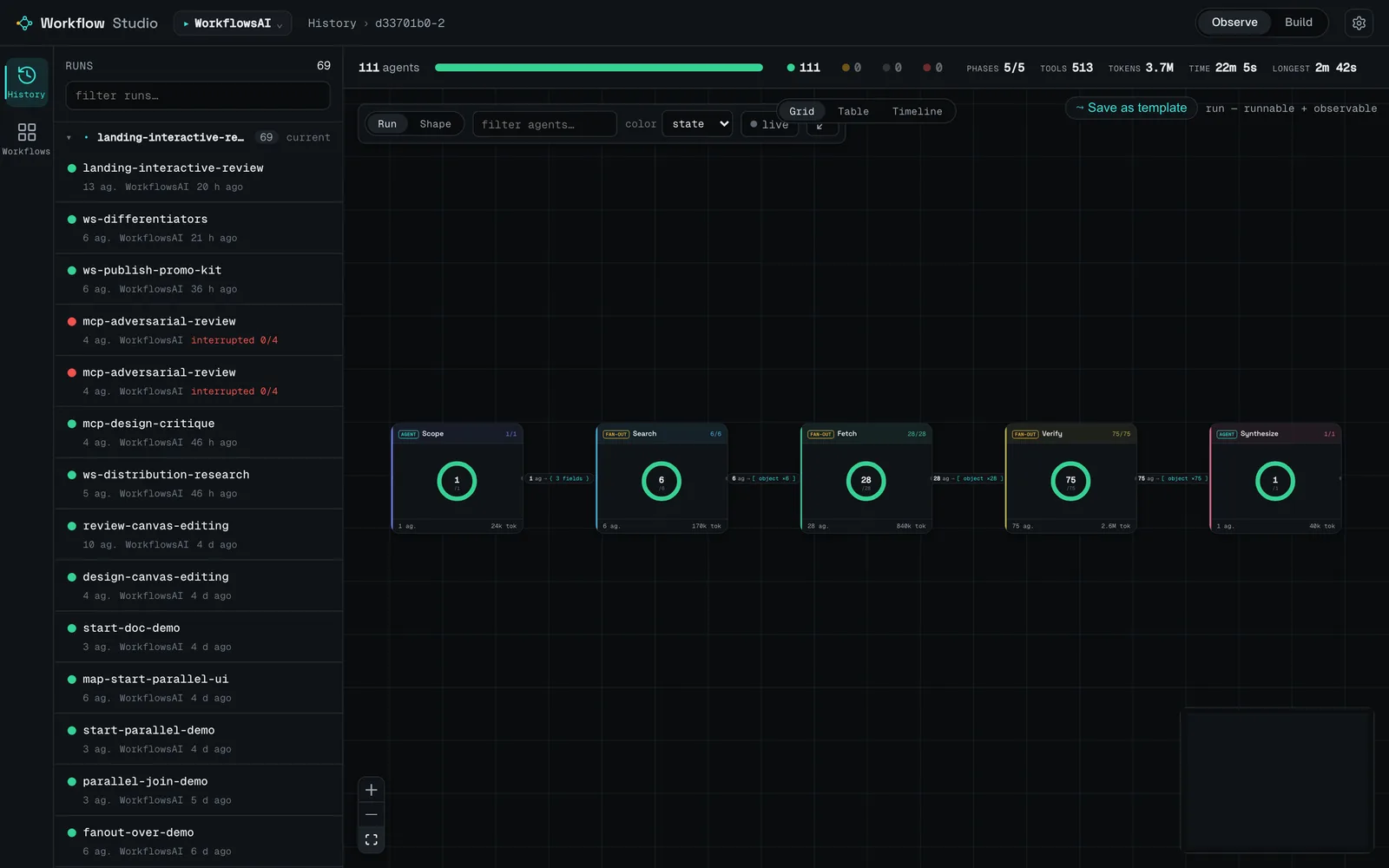
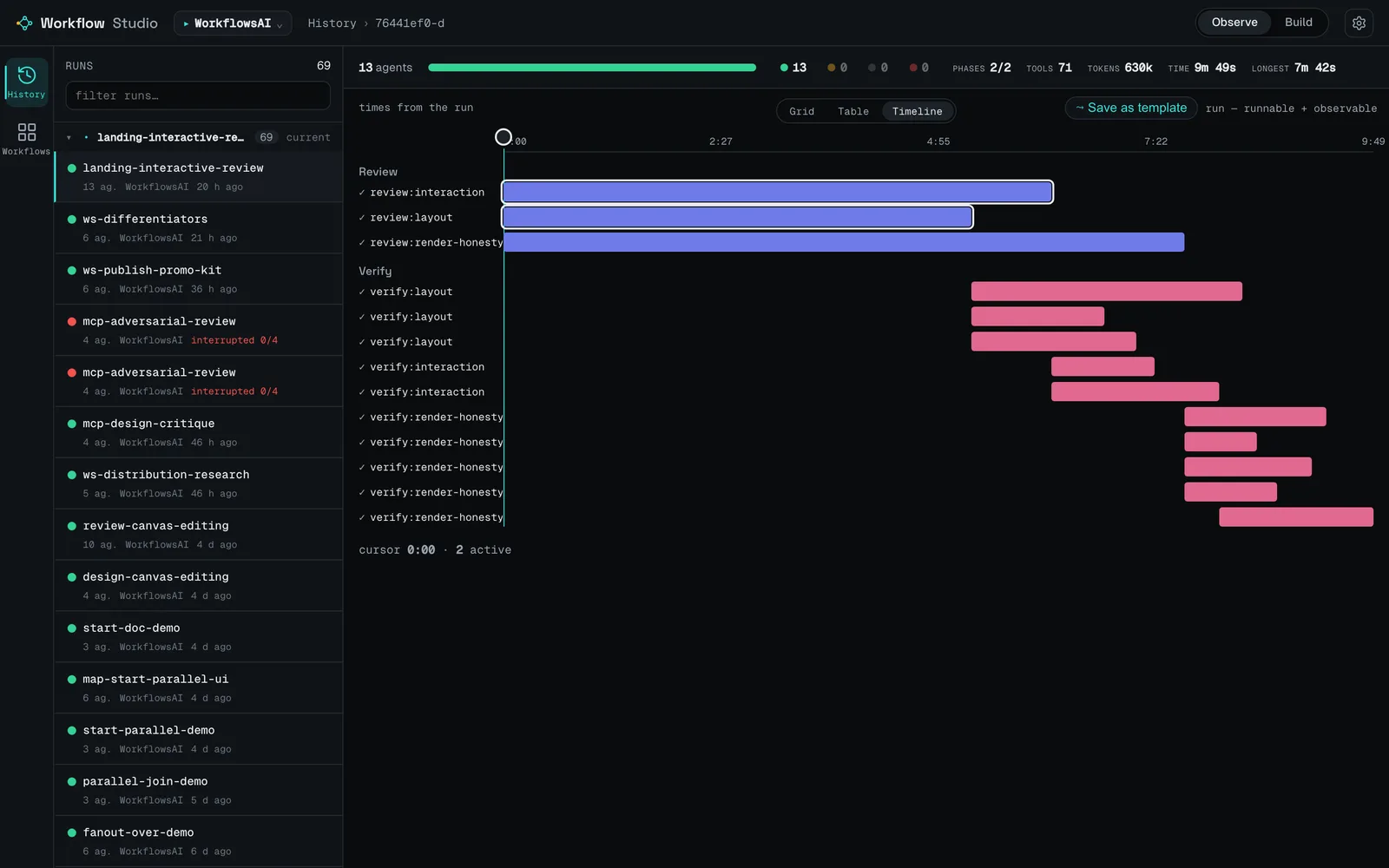
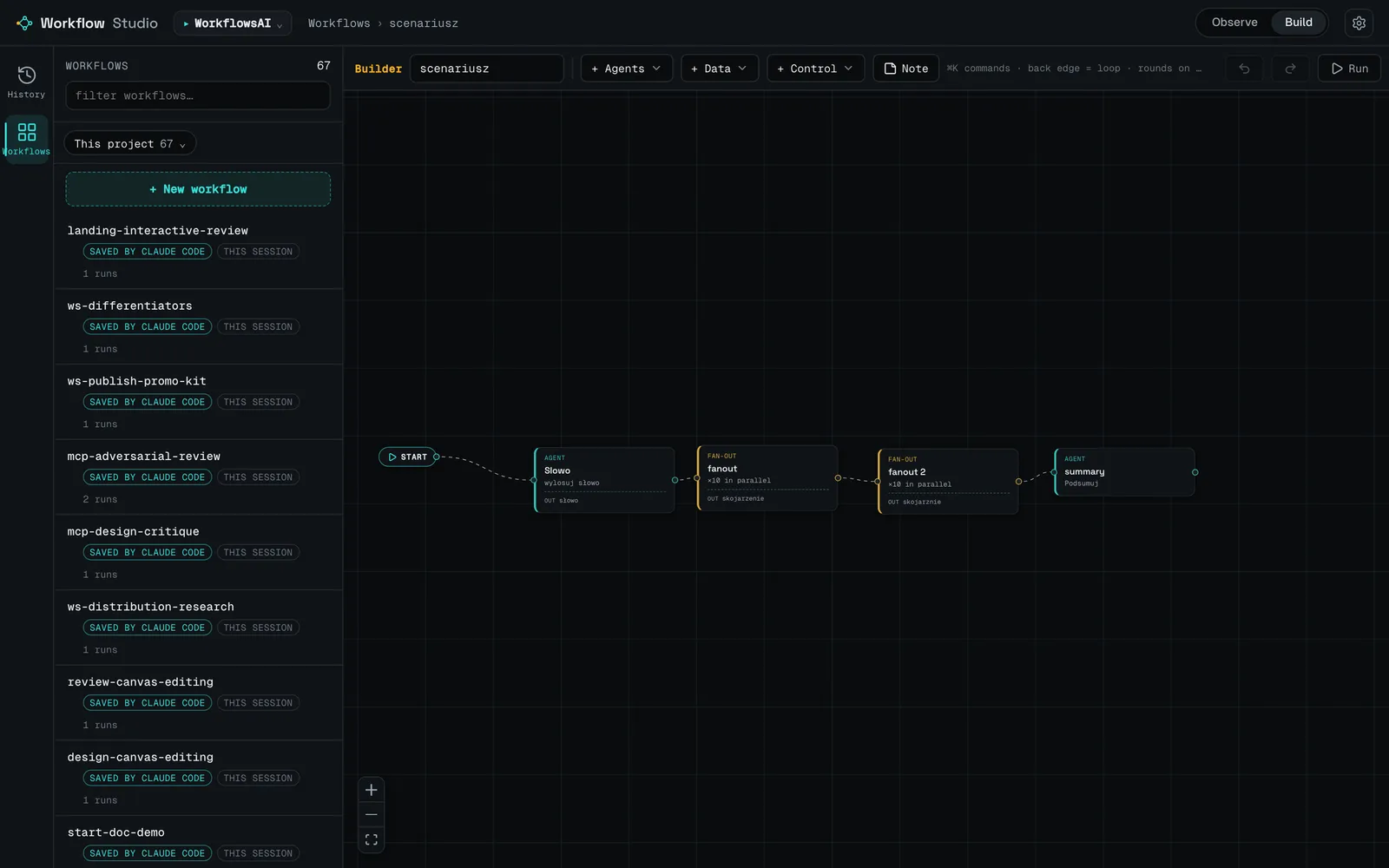
Observe a run as an interactive graph or a wall-clock timeline, and author new ones on the canvas. Below: a 111-agent research pipeline, its timeline, and the block builder.
For Claude Code Workflows
Claude Code's Workflow tool fans out dozens of agents in parallel — but you write it in JS and read the result out of a black box of logs. Workflow Studio gives you a no-code canvas to design the run and a dashboard to see what it did — then hands both to the agent over MCP.
a run, as you'll see it — illustrative schematic
Drop blocks on a canvas and wire them up. Workflow Studio compiles the graph to a real, runnable Claude Code Workflow script — the native primitives plus a sidecar so the design round-trips losslessly. Each block declares a typed output; downstream blocks branch and map on real fields.
add · drag · connect ports · click to select then ⌫ to delete · ▶ Run fires parallel branches together · illustrative
Every "new workflow" begins from a built-in pattern that already exercises the dynamic primitives. Pick one, then extend it in the editor. Seven ship today:
Agent + in-place iteration — a clean base to build on.
A classifier (enum) routes to one of the branches — a k-way router.
N parallel attempts reduced by a synthesizer.
Independent verifiers try to refute the worker's result.
A list of candidates filtered by a field — the best ones remain.
Many attempts; a judge compares them pairwise and picks a winner.
Iterate as long as the agent finds something new (loop-until).
Every run becomes a graph you can read: phases, the fan-out, tokens per agent, the branch taken, and each agent's typed output. Live runs included. And the numbers are honest — an estimated metric is labelled, never presented as measured.
click any node to inspect its typed output → · drag to rearrange · illustrative
{
  intro text
  differentiators list ×5 of { title, body }
  comparison list ×5 of { name, whatItIs, … }
  caveats list ×5 of text
}
Observe a run as an interactive graph or a wall-clock timeline, and author new ones on the canvas. Below: a 111-agent research pipeline, its timeline, and the block builder.
Runs and saved designs from your projects, each with a live structure preview. Reopen a design, compare runs, or hand one to the agent.
the Workflow library — real structure previews per card
Workflow Studio isn't a LangGraph, CrewAI, or n8n competitor — it's a different layer of the stack. Those hand you a runtime to adopt (each portable across providers — a real strength); Workflow Studio assumes you already run Claude Code and gives you a way to see what a run did and author new ones visually.
LangGraph, CrewAI, AutoGen, the OpenAI Agents SDK, n8n and Flowise are each an execution engine you adopt — and each is portable across LLM providers, which is genuinely valuable. Workflow Studio ships no runtime and defines no agents of its own: it sits on top of one you already have (Claude Code's built-in Workflow tool) and hands the agent a compiled script Claude Code itself runs.
Strong observability already exists elsewhere: LangSmith for LangGraph, AutoGen's OpenTelemetry, the OpenAI Agents SDK's built-in tracing — via their SDK and a dashboard (hosted, or self-hosted for OTel). Workflow Studio instead passively reads Claude Code's own on-disk run artifacts — no SDK, no account — and flags heuristic data instead of presenting it as measured.
Visual authoring is common ground — AutoGen Studio, n8n and Flowise have capable canvases, several more full-featured than ours (LangGraph Studio visualizes a graph you coded rather than authoring one). What differs is the compile target: our 12-block canvas emits a real Claude Code Workflow script, not a graph bound to its own engine.
Running locally isn't unique — the frameworks' libraries and self-hostable builders (n8n, Flowise) all run on your machine. The honest difference is operational weight: the core is pure standard library with zero runtime dependencies, binds only to 127.0.0.1, and needs no database, account, or telemetry.
MCP support isn't distinctive by itself. The loop is: the same Claude Code agent that runs the workflow also discovers your designs over MCP, reads their declared contract, inspects the observations, and drafts new designs back into your builder — so a one-way script-on-disk handoff becomes a shared, two-way surface. (It can't start a run; it hands the agent a script the agent runs with its own Workflow tool.)
| Tool | What it is | Authoring | Observes real runs | Local · no account | Claude Code |
|---|---|---|---|---|---|
| Workflow Studio | Local observe + author layer for Claude Code's built-in Workflow tool. Not a runtime. | No-code canvas (12 blocks) → compiles to a real Workflow script | Yes — reads Claude Code's on-disk artifacts; no SDK; heuristics flagged | Yes — 127.0.0.1, zero-dep stdlib, no account/telemetry | Purpose-built — agent drives it over MCP (can't start a run) |
| LangGraph + Studio | Provider-agnostic framework for stateful graph agents (Py/JS) | Code-first — hand-write a StateGraph; Studio visualizes/debugs it | Yes (strong) — step/time-travel; deep tracing via LangSmith | Partial — lib + langgraph dev local; Studio needs a (free) LangSmith account | None — any LLM; drives its own runtime |
| CrewAI / AutoGen | Code-first multi-agent frameworks (CrewAI MIT; AutoGen now maintenance → MS Agent Framework) | Code (Python / YAML). AutoGen Studio adds a capable no-code GUI | Yes/partial — instrument the runtime (AutoGen OTel; CrewAI AMP / SaaS) | Partial — libs local; CrewAI obs hosted-first, AutoGen OTel self-hostable | None — model-agnostic; no Claude Code integration |
| OpenAI Agents SDK | Lightweight code-first framework (successor to Swarm) | Code only (Python / TS) | Yes — built-in tracing, on by default | Partial — traces default to OpenAI's hosted dashboard; no bundled local UI | None — OpenAI's SDK (Claude usable via adapter) |
| n8n / Flowise | General visual low-code platforms that ARE the runtime (automation / LLM apps) | Visual no-code / low-code canvas | Yes — but of runs inside their platform, not Claude Code runs | Yes (self-host, often Docker) — n8n fair-code; Flowise Apache-2.0 | None native — integrate Claude the model via API, not Claude Code |
Reflects each tool's own positioning as of mid-2026 (licenses/status change). All are capable in their niche — several have more full-featured canvases or tracing than v0.2.0 — and model/provider portability is a real strength of every other tool here. The axis is fit, not ranking.
You're probably already in a coding agent. Hand it this and walk away — it installs the plugin, checks the MCP server is connected, and tells you when to restart.
Requires uv / uvx on your PATH.
Read https://github.com/hculap/workflow-studio/blob/main/AGENT_INSTALL.md
and set up Workflow Studio for me — run the steps, verify it,
and tell me whether to restart Claude Code.
Prefer to do it yourself? In a Claude Code session:
/plugin marketplace add hculap/workflow-studio
/plugin install workflow-studio@workflow-studio